5 Hidden Gem Apps for Korea That Most Tourists Miss

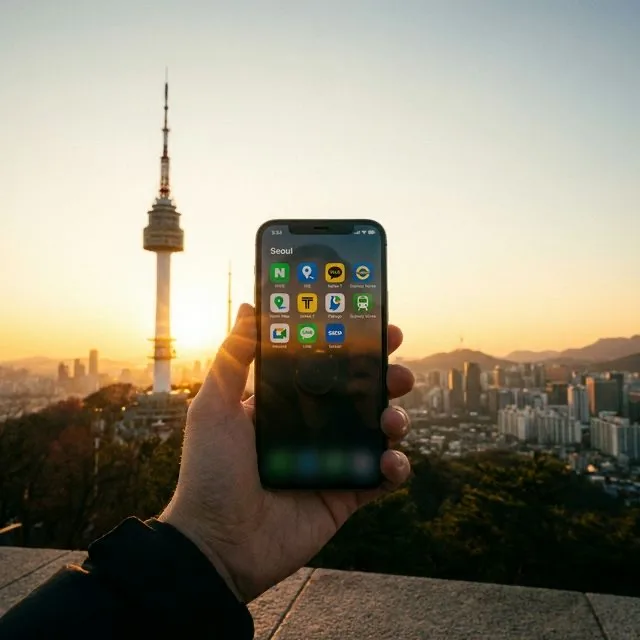
Every Korea travel guide tells you to download the same three apps: Naver Map for navigation (more accurate than Google Maps for Korean transit), Kakao T for hailing taxis, and Papago for translation. If you do not have all three of these installed before you board your flight, download them now and come back to this article. They are genuinely essential and there is no substitute for any of them in the Korea context.
But there is a second layer of apps that most tourists never discover — tools that solve problems you will definitely encounter but don't know to prepare for. These are not niche apps for specific enthusiasts; they are quality-of-life solutions to universal Korea traveler problems. The visitor who knows about CatchTable can book the restaurant that other visitors are waiting outside of for two hours. The visitor who knows about Subway Korea's car-door feature walks through transfers that leave other travelers walking an extra five minutes at every interchange.
Here are the five apps worth installing before departure, with setup instructions for each.
1. CatchTable Global — Restaurant Reservations Without a Korean Phone Number
The Problem
Korea's hottest restaurants — the ones trending on Korean food media, the Michelin-starred spots, the Instagram-famous cafes with 90-minute queues — almost universally require reservations. And Korean reservation systems almost universally require a Korean phone number for SMS verification.
If you walk up to a trendy restaurant without a reservation, you will typically be handed an iPad at the door showing a queue system. That system will ask for a Korean phone number. You enter your foreign number. It fails. The staff apologizes and adds you to a manual waiting list with a quoted wait time of 60 to 90 minutes. This is one of the most common points of friction for foreign visitors in Seoul's food scene.
The Solution: CatchTable Global
CatchTable is Korea's dominant restaurant reservation platform, used by virtually every serious restaurant in Seoul for slot management. The company released a dedicated Global version specifically for foreign visitors, with key differences from the standard Korean app:
- Account creation with email only — no Korean phone number required
- International credit card payment — Visa, Mastercard, Amex, and select local cards all work
- English menus and restaurant descriptions
- Cancellation deposit system — many top restaurants require a small deposit (typically 10,000 to 20,000 KRW) that is refunded at visit or forfeited for no-shows
Setup (do this before departure):
- Download "CatchTable Global" from the App Store or Google Play
- Create an account using your email address
- Add your international credit or debit card under Payment Settings
- Browse available restaurants by neighborhood or cuisine type
How reservations work: Search by date and party size. Available time slots appear for the coming 30 days for most restaurants. Slots at the most popular places open at midnight Korea time (or 1:00 p.m. for some) on specific dates — typically 30 days in advance. If you have a specific restaurant in mind, check when their slots open and be ready with the app at that time.
Restaurants worth booking via CatchTable:
- London Bagel Museum (consistently full months in advance)
- Mosu, Evett, Onjium (high-end Korean restaurants)
- Popular Korean BBQ specialists (Mapo Jeongdaegam, Palsaik Samgyeopsal)
- Specialty ramen and udon counters with limited seating
The honest limitation: Not every restaurant in Korea uses CatchTable. Some use their own Naver booking page (which also has foreign visitor issues), some use Instagram DMs for reservations, and some are walk-in only. CatchTable covers enough of the premium restaurant scene to be essential without being universal.
2. BucaCheck — T-Money Balance Without Hunting for a Machine
The Problem
The T-Money transport card is the essential Korea transit tool — you tap it at subway turnstiles, bus readers, and convenience stores, and it covers essentially all transit in Korea. But it has no display, and the balance is only shown when you tap at transit gates or navigate to specific machines inside stations.
Running out of balance at a subway turnstile causes a specific type of humiliation: the gate beeps twice, the display shows 잔액부족 (insufficient balance), and you perform a backwards walk of shame while a queue of commuters watches. Then you spend 5 to 10 minutes finding the reload machine, loading cash, and re-entering.
The Solution: BucaCheck (버카첵)
BucaCheck is an app that uses your phone's NFC (Near Field Communication) chip to read your T-Money card directly, displaying your exact balance and recent transaction history in seconds.
How it works:
- Open the BucaCheck app
- Hold your T-Money card against the back of your phone (NFC reader location varies by phone model — usually the top third of the back panel)
- The app reads the card instantly and displays your balance and the last 10 transactions
Device compatibility:
- Android phones: Most models with NFC support BucaCheck fully
- iPhone 7 and later: Supported (Apple opened NFC to third-party apps from iOS 13)
- iPhone 6 and older: Not supported
Why this matters: Rather than checking your balance only after it fails at a gate, you can check proactively at any point. Develop the habit of tapping your card to your phone when you enter a station — if your balance is under 2,000 KRW, reload before heading through the gate.
Bonus feature: The transaction history shows every tap, including bus numbers and subway lines. Useful for reconstructing where you went and what routes you used if retracing your day.
Setup: No account creation required. Download, open, tap card. That is the complete setup.
3. Shuttle Delivery — Food Delivery Without a Korean Registration Number
The Problem
Korea's dominant food delivery apps — Baedal Minjok (배달의민족) and Coupang Eats — serve as the infrastructure for ordering fried chicken, jjajangmyeon, kimbap, and essentially anything else to your accommodation at any hour. But both require Korean Resident Registration Number (주민등록번호) verification for account setup, plus a Korean phone number for SMS.
Foreign visitors cannot create accounts on either platform without a Korean number and residency documentation. When it is 11:00 p.m. and you want delivery fried chicken in your hotel room, the standard Korean apps are inaccessible.
The Solution: Shuttle Delivery
Shuttle is a food delivery service built specifically for the expat and foreign visitor market in Korea. Its key differentiators:
For account setup:
- Email registration only — no Korean phone or ID required
- Payment via PayPal, Apple Pay, or international credit cards (Visa, Mastercard, Amex)
For ordering:
- Fully translated menus in English
- Restaurant names in English where possible, with Korean name shown as secondary
- Bilingual customer service (Korean and English) handles delivery issues, wrong orders, and missed deliveries
Coverage: Best coverage in Seoul — particularly strong in Itaewon, Gangnam, Hongdae, Mapo, and Hannam-dong. Also available in Busan (Haeundae and Seomyeon areas) and Pyeongtaek (near US military bases, where the service originated). Coverage thins significantly in suburban areas and outside major cities.
Setup (do before departure):
- Download "Shuttle Delivery" from App Store or Google Play
- Create account with email
- Add international payment method
- Add your Korea accommodation address once you have it
The delivery logistics: Shuttle uses Korean delivery drivers who work through a coordination layer. Orders occasionally require the driver to call you; Shuttle's customer service can mediate these calls. The app also allows text notes to the driver and delivery to lobby/door instructions.
Practical note: Shuttle's menu selection is more limited than Baedal Minjok's massive catalog. It focuses on the most popular and easily translatable restaurant types (fried chicken, Korean BBQ, jjajangmyeon, pizza, burgers) rather than every neighborhood restaurant. For specialty orders, it may not carry your specific desired restaurant.
4. Emergency Ready — Government Alerts in English
The Problem
Korea's national emergency alert system sends text messages to all phones on Korean mobile networks during emergencies: earthquake alerts, extreme weather warnings, North Korea missile test notifications, public health alerts, and civil defense drills. These messages arrive in Korean.
If your phone alerts sound in the middle of the night with a message that reads "경계경보 미사일 발사" and you cannot read Korean, you have two options: ignore it (potentially dangerous) or spend time trying to translate a time-sensitive emergency message while alarmed.
The Solution: Emergency Ready (안전디딤돌)
Emergency Ready is the Korean government's official emergency information app, developed by the Ministry of Interior and Safety. It provides emergency alert content in English (and several other languages) for international residents and visitors.
Key features:
Real-time alert translation: When a Korean emergency alert is issued, the app receives and displays the content translated into your selected language simultaneously with the Korean broadcast.
Emergency facility locator: Using your GPS, the app displays the nearest:
- Hospital emergency rooms (응급실) with hours and English-speaking capacity noted
- Police stations (경찰서)
- Community shelter locations
- Pharmacies with late-night hours
Civil defense drill information: Korea conducts periodic civil defense drills (민방위 훈련) requiring pedestrians to take cover. These are announced in advance and the app provides schedule and explanation so you are not confused by the sudden public activity.
Offline functionality: Core features (shelter locations, emergency procedures) work without active internet connection, which is valuable during infrastructure-disrupting events.
Setup:
- Download "Emergency Ready" (Korean name: 안전디딤돌) from your app store
- Open the app and grant location permissions
- Select your preferred language under Settings
- Enable push notifications
Usage frequency: Most visitors to Korea will never need this app for an actual emergency. The reassurance value — knowing that if something unexpected happens you have government emergency information in English — is worth the 90-second setup.
5. Subway Korea — Secret Car-Door Information
The Problem
Naver Map tells you the complete transit route: take Line 2 from Hongik University to Sindorim, then transfer to Line 1 to Seoul Station. What it does not tell you is: board Car 3, Door 2 to be positioned directly at the Line 1 transfer corridor when you arrive at Sindorim.
At major Seoul interchange stations — Sindorim, Seoul Station, Jonggak, Express Bus Terminal — the difference between being at the right car and the wrong car is 3 to 7 minutes of walking through subterranean corridors. This adds up across a day of transit.
The Solution: Subway Korea (지하철종결자)
Subway Korea, developed by Malang Studio, is the app that serious Seoul transit users use for one specific feature: car and door position recommendations for transfers.
For any transit segment on the Seoul metro, the app tells you:
- Which subway car number to board (e.g., "Car 5")
- Which door within that car (e.g., "Door 3")
- What is directly adjacent to that door at the destination station (stairs up, transfer corridor, elevator)
Following this positioning advice at Sindorim Station — one of Seoul's busiest interchanges — can save 5 minutes compared to arriving at a random car position. At Seoul Station, where the KTX/AREX and subway lines create a large complex, the car positioning makes exits and transfers significantly faster.
Additional features:
- Full offline subway map (download for your trip — useful when underground without signal)
- Real-time train arrival information for each station
- Last train departure times by line (essential for night transit planning)
- Station facility information (elevators, restrooms, convenience stores within the station)
Setup:
- Download "Subway Korea" (Malang Studio) from App Store or Google Play
- Open the app and allow it to download the offline map
- To use car positioning: Enter your route, select the specific line segment, and look for the car/door recommendation
Compatibility note: The app is produced by a Korean developer and has English translation for navigation, though some secondary screens remain in Korean. The core car positioning feature is usable without reading Korean — the numbers and visual diagram communicate the essential information.
6. 2026 Innovation: The AI Translation Revolution
While Papago remains the standard, the 2026 update to the app—and the rise of competitors like DeepL Korea—has fundamentally changed how visitors interact with the written word.
- Papago "Live AR Menu" Mode: In 2026, you no longer need to take a photo of a menu to translate it. The new "Live AR" mode overlays perfectly translated, high-resolution text onto your camera feed in real-time, even maintaining the original font style. This is especially useful for handwritten chalkboard specials in traditional markets.
- Whisper-Based Real-Time Interpretation: For face-to-face conversations, the new AI Whisper feature allows you to wear one wireless earbud while the person you are speaking to holds the phone. The translation is nearly instantaneous and context-aware, handling Korean honorifics far better than the 2024 versions.
7. Digital Wallet Mastery: The WowPass & NAMANE Ecosystem
Physical cash is disappearing even faster in 2026. The WowPass app has become the central "Travel OS" for most visitors.
- App-Based Top-up: Gone are the days of needing to find a kiosk to load your card. In 2026, the WowPass app allows for direct top-up via your international bank account (though a small currency conversion fee applies).
- The "Dutch Pay" (Split Bill) Feature: If you are traveling as a group, the 2026 WowPass app includes a feature that allows you to tap your phones together to instantly split a restaurant bill. No more awkward math at the register after a 12-person BBQ session.
- NAMANE Customization: For those seeking a souvenir, the NAMANE app allows you to design a transport card with your own photos before you arrive. You simply scan a code at the airport kiosk to print your custom card.
8. Personal Safety 2.0: The AI SOS Mesh
Safety has always been a hallmark of Korea travel, but the 2026 AI SOS Mesh system provides an invisible safety net for solo travelers.
- Integrated Emergency Beacons: Most major travel apps (including Naver Map and WowPass) now include a "Safe Walk" mode. If the app detects an unusual deviation from your route or a sudden drop in your phone's movement (indicating a fall), it will send a silent "Are You Okay?" push notification. If not dismissed, it alerts local "Safety Hubs."
- AI-Pathfinding for Night Walks: If you are walking back to your hotel late at night, Naver Map now features a "Bright Path" toggle, which prioritizes streets with high-intensity LED lighting and active CCTV coverage, ensuring you never find yourself in a dark alley unnecessarily.
The Complete Pre-Departure Checklist
| App | Primary Use | Setup Required Before Trip | Platform |
|---|---|---|---|
| Naver Map | Navigation (transit + walking) | Download, language set to English | iOS/Android |
| Kakao T | Taxi hailing | Account creation, payment card | iOS/Android |
| Papago | Translation (text, camera, voice) | Download only | iOS/Android |
| CatchTable Global | Restaurant reservations | Account + payment card | iOS/Android |
| BucaCheck | T-Money balance check | Download only | iOS/Android |
| Shuttle Delivery | Food delivery in English | Account + payment card | iOS/Android |
| Emergency Ready | Emergency alerts in English | Download + language setup | iOS/Android |
| Subway Korea | Car positioning for transfers | Download + offline map | iOS/Android |
The first three (Naver Map, Kakao T, Papago) are the universally recommended essentials. The five described in this guide — CatchTable Global, BucaCheck, Shuttle Delivery, Emergency Ready, and Subway Korea — constitute the intermediate layer that elevates the Korea travel experience from functional to fluent.
Before you head out to test these tools, ensure you have the hardware to match: choose the best data option with our SIM Card vs. Pocket WiFi Guide, and master the T-Money Card for seamless tapping on the subway. For a complete look at how to structure your journey using all these tools, follow our Ultimate 10-Day South Korea Itinerary for First-Timers.